Pattern Engine
Create, analyze, and practice skratch combinations with visual motion, guided training, local audio, MIDI control, and direction-aware preflight.
Generator · Motion Map · Training · Audio · MIDI · DLT™.
Saved Combos
Quick access, practice rotation, and clean export
Powered by Direction Logic Technology™ (DLT™)
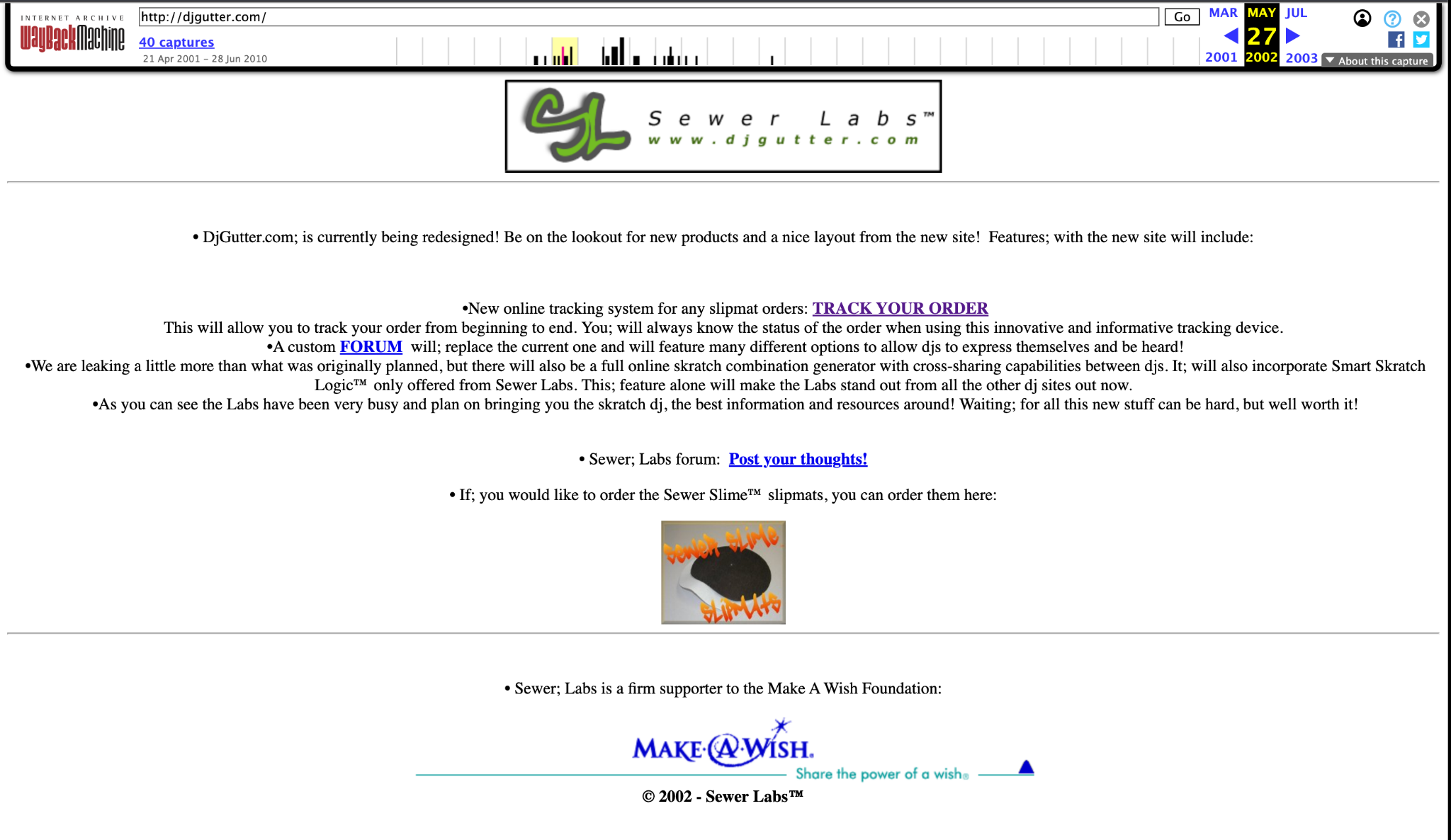
Smart Skratch Logic™ is the revived name for a scratch-aware logic concept documented on djgutter.com on May 27, 2002, where an upcoming online skratch combination generator was described as incorporating Smart Skratch Logic™. In the modern Pattern Engine, that earlier idea has evolved into Direction Logic Technology™ (DLT™), the motion-aware preflight engine that follows record direction from one technique to the next and checks whether the next movement makes physical sense from where the previous movement leaves the record.
For direct verification, review the archived djgutter.com page and the preserved screenshot below. Together they show the May 27, 2002 reference to an upcoming online skratch combination generator that would incorporate Smart Skratch Logic™.
Smart Skratch Logic™ is the concept and identity; DLT™ is the current engine underneath it. A combo can look fine in text while still asking the record hand to continue in a direction that does not fit the preceding motion. DLT™ catches that before you practice it.
DLT™ checks the complete scratch sequence before the pattern is displayed.
Forward and reverse movement are evaluated against the motion state left by the previous technique.
If DLT™ finds a mismatch, it solves for a valid phrase using the fewest safe direction changes.
The proposed runtime pattern must pass a second validation before it is allowed to load.
DLT™ works on a temporary runtime copy. Stored presets and WordPress data are not rewritten when a direction is corrected.
When the record changes direction with the fader still open, the sound briefly stops at the turnaround. That tiny break is called a phantom click. You didn't actually click the fader — the change in record direction created it. DLT™ keeps phantom clicks separate from real fader clicks and silent resets.
DLT™ performs automatic record-direction continuity checks and now annotates articulation mechanics: actual fader clicks, qualifying phantom clicks, and silent resets. The corrected runtime pattern is then used consistently by Current Combo, Motion Map, practice tools, sharing, and exports.
Current Combo
Share / Export
Session Lab
Variation Lab
Scratch SampleBeat Looper
Session Stats
Pro Practice Lab
Smart Training
Vocabulary + Technique Progression
Pattern Tools + Challenges
Practice Presets
Crates + Set Builder
MIDI Controller
Share + Studio + App
The GV Pattern Engine on GoldVoltron.com is an independent educational implementation inspired by the TTM framework. It is not affiliated with or endorsed by the TTM creators, and it does not claim to replace the official TTM method or documentation.
For the official TTM history, resources, and documentation, visit www.ttm-dj.com.
Respect the craft. Study the source.
- Renamed the public Sample Curve Motion Map style to Chile Fries while retaining the existing internal style key so saved settings and older shared links remain compatible.
- Rebuilt that graph as a dedicated white practice chart with green 1-2-3-4 strips across the top and bottom, gray timing grid, heavy black motion line, black articulation dots, white open silence/end circles, an angled Sample label, and a lower-left silence marker.
- Playback in Chile Fries now uses a translucent purple vertical playhead through the graph while the existing Motion Map playback engine, segment timing, focus logic, and marker activation continue to drive the visualization.
- Linear, Organic, Scratch Notation, TTM-Inspired, generator logic, DLT™, audio, MIDI/Launchpad, saved combos, exports, PWA/offline behavior, and WordPress pattern data are unchanged.
- Fixed the Quick Overview / Start Here strip on iPad and medium-width tablet layouts so the call-to-action no longer expands across the row and crushes the explanatory text into a narrow column.
- Tablet layouts now keep the overview copy flexible while the Quick Overview button stays at a stable compact width.
- Phone behavior remains stacked with a full-width button, while desktop behavior is unchanged.
- Sample Curve, generator logic, Motion Map behavior, DLT™, audio, MIDI/Launchpad, saved combos, exports, PWA/offline behavior, and WordPress pattern data are unchanged.
- Added Sample Curve as a fifth Motion Map style alongside Linear, Organic, Scratch Notation, and TTM-Inspired.
- Sample Curve uses a compact count strip, a SAMPLE-to-SILENCE vertical reference, a smooth white/gray record-motion curve, filled articulation dots, open turnaround circles, and the existing live cyan/gold playback tracer.
- The graph is a GoldVoltron visualization inspired by classic scratch-training diagrams; it does not replace or claim to reproduce an official notation system.
- Share links, saved interface settings, Surprise Me, playback tracing, focus mode, exports, and restored views now preserve Sample Curve.
- Generator logic, DLT™, scratch definitions, audio, MIDI/Launchpad behavior, saved combos, PWA/offline behavior, and WordPress pattern data are unchanged.
- Fixed the Quick Overview close control by replacing the fragile SVG-only icon with a clear × character and stronger close-button contrast.
- Centered the Open Full Manual control, removed link-decoration bleed-through, and prevented both footer actions from wrapping awkwardly.
- Added a persistent Start Here / Quick Overview strip directly above the desktop Workspace navigation so new users can discover the feature without digging into Pro Mode.
- The new Start Here strip opens the same Quick Overview modal and stays out of Studio / TV and Turntable views to keep those focused layouts clean.
- No changes to generator logic, DLT™, MIDI, audio, saved combos, exports, or WordPress pattern data.
- Added a small New User / Start Here visual hint near the Quick Overview entry so first-time users can discover the overview faster.
- Quick Overview buttons now use a slightly more visible featured treatment while keeping the existing dark Ableton-style UI intact.
- Studio / TV Mode quick-overview access remains available, along with the larger timing ruler and visible exit controls added in v5.1.40.
- Pattern generation, audio, MIDI, exports, and stored data behavior remain unchanged.
- Added a Quick Overview tour for new or returning users so the strongest Pattern Engine features are easier to discover from one place.
- Added visible Quick Overview entry points inside Share + Studio + App and inside Studio / TV Mode so feature discovery stays close to the workflow.
- Studio / TV Mode now includes a persistent Exit control and Escape-key exit support, so users are not trapped after switching to the large-screen view.
- Enlarged the BAR / BEAT timing ruler and related motion labels in Studio / TV Mode for easier across-the-room readability.
- Pattern generation, DLT™, MIDI behavior, audio tools, saved combos, and WordPress data remain unchanged.
Site designed by GV.
This site was designed, shaped, and built by me — GV — one decision at a time. I wanted complete control over how GoldVoltron looks, feels, and works instead of fighting templates, page builders, or other BS.
The public experience you see here is custom-designed and custom-coded around GoldVoltron rather than dropped into a stock template. The tools, layouts, connections, little details, and constant refinements exist because I wanted the site to work the way I thought it should.
It has taken a long time, a lot of trial and error, and a ridiculous number of small decisions. It is still evolving, but that is part of the point.